Purpose
For optimal performance of the KUARIO MFP Kiosk solution on Ricoh SOP multifunctional printers (MFPs), it is important that the MFP timer settings are properly aligned with those of the KUARIO application.
Recommendation
We recommend configuring the Ricoh MFP timer settings to be more generous than those of the KUARIO MFP Kiosk. This prevents the MFP from logging out earlier than the KUARIO application, which could result in incomplete tasks and a negative user experience.
Consequences of Incorrect Settings
If the Ricoh MFP logs out before the KUARIO application:
- Ongoing tasks may not be completed correctly.
This may lead to confusion or frustration for users.
Refund of payment (via KUARIO App or voucher if paid with cash or debit/credit card)
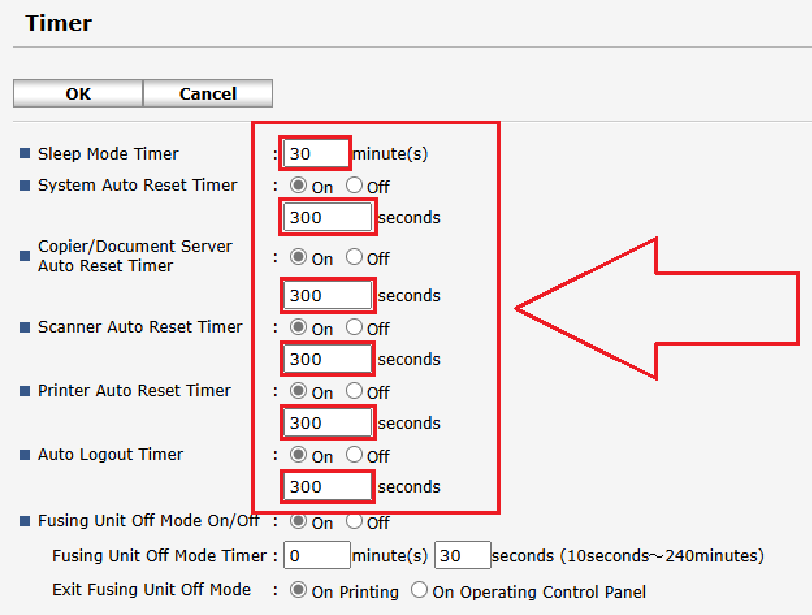
Recommended Timer Settings
- Ricoh Sleep Mode Timer: ON – 30 minutes
- Ricoh System Auto Reset Timer: ON – 300 seconds
- Ricoh Copier/Document Server Auto Reset Timer: ON – 300 seconds
- Ricoh Scanner Auto Reset Timer: ON – 300 seconds
- Ricoh Printer Auto Reset Timer: ON – 300 seconds
- Ricoh Auto Logout Timer: ON – 300 seconds
- KUARIO Session Timeout: 240 seconds
Ensure that Ricoh timers are always set at least 1 minute longer than the KUARIO timers.